
Released on May 13, 2026 • posted by Nikky
Small update to the production sheets to make location closures/openings easier to manage.
There is now a Status / From / To section in the Store Links tab. This means we can mark stores as closed directly from there, either for a single day, a date range, or permanently if needed.
By marking a store as closed, it will show 'CLOSED' on top of the store as seen below and will return a blank for all figures.
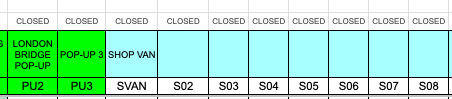
Example: If a store is due to be closed between 22nd and 25th of May when they would usually be open, it means they likely have figures for those days which would normal break the sheet as it would return a NUM. If we now mark the store are CLOSED between the relevant dates it will return blanks meaning no errors to allow for seamless printing.
Basic logic:
Also added an automatic column-hiding update. If a store is marked as CLOSED, that store’s column will now hide automatically from the relevant production tabs. If the store is open again, the column will show again. This does take a second or two to load so please be mindful.
Alternatively, if you're at all worried/want to double check you can manually refresh here:

This should make temporary closures, permanent closures and pop-up dates much easier to manage without needing to manually hide columns or update formulas across the sheet.